Skip to content

Features

Everything a full team does — in one place

Engineering, product, marketing and operations experts who work from your board, a project tool built around them, and an office where you can watch it all happen. Hire only the roles you need; they work together from day one.

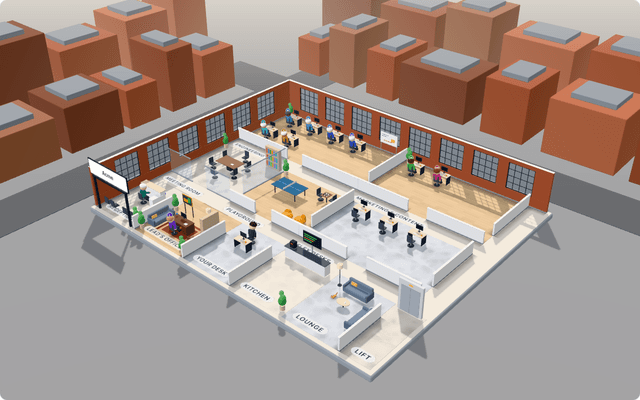
The Neeurn virtual office: AI teammates at their desks, a meeting room, a kitchen and a playground, rendered in 3D.

The AI team

Specialists that each own a job — and a Lead that hands every request to the right one.

Learn more →

18 expert roles

Engineering, product, marketing and operations — each trained in its craft. Hire up to five of each; they work in parallel.

A Lead that routes

Ask in plain words; the Lead brings in the teammate whose job it is, or splits the work across several.

Skills and your own rules

Every role ships with skills; switch them off or add your own, like your branch naming or tone of voice.

Working hours

Teammates start work only during the hours you set; running work is never cut off.

Meetings that produce work

Sprint planning, retros and stand-ups in the meeting room; action items become tasks on the board.

A budget per organization

Every AI call is metered per teammate; a monthly budget stops new work before it’s crossed.

Engineering

Engineers, a Planner and a Reviewer: from a task on your board to a pull request that has already been tested.

Learn more →

Pull requests, not pushes

Each task runs in a fresh copy of your repository and ends as a pull request to the branch you choose.

Independent AI review

The Reviewer runs your tests itself; every command it ran is recorded next to its verdict.

Plans before code

Ask for an implementation brief first — every file it names is checked against the real code.

Dependencies, in order

A task blocked by another waits for it and builds on its branch; merges retarget the rest.

Memory that learns

Completed tasks, review findings and merged pull requests make the next task better.

Resumes after a crash

A run that’s interrupted picks up at the task it was on — not from the start.

Product & delivery

A Product Manager, Task Creator and Sprint Planner who keep your backlog ready to build.

Learn more →

Built-in project management

Boards, backlog, stories, sprints, plans and goals — or connect Linear, Jira, GitHub Issues or Superthread.

PRDs from a sentence

Describe a goal; the Product Manager writes the problem, the users, success and scope.

Stories anyone can pick up

The Task Creator turns plans into tasks with one outcome and acceptance criteria each.

Sprints that plan themselves

Sized to your team’s capacity, with a goal and owners — then a review and a retro.

Dependencies, in order

Mark what blocks what; blocked work waits and builds on top of its blocker.

Reminders that follow up

Overdue or due-soon tasks, by assignee, priority and sprint — in the app, by push or email.

Content & marketing

A CMO, SEO Specialist, Writer and Editor who plan, write and refresh your content.

Learn more →

Positioning and messaging

The CMO defines who you’re for and what you say, and turns it into a content calendar.

SEO briefs from search intent

Keyword research, people-first guidance and a brief the writer can follow.

Drafts in WordPress

New posts and pages, edits to existing ones — always saved as drafts first.

Refresh slipping articles

Rewrites what’s weak against the pages it competes with and updates the SEO meta.

Checks on every draft

Title keyword, length, FAQ structured data and working links — plus an editorial review.

Approval before it’s live

Publishing, updating a live post or deleting always waits for your OK.

Operations & automation

An Operations teammate and a Workflow Designer who take the routine work off your plate.

Learn more →

Daily brief

Today’s calendar, a short overview and the mail that matters, every morning.

Inbox triage

Labels unread email, drafts replies (never sends) and turns action emails into tasks.

Meeting notes → tasks

Every action item becomes a task, traced to the sentence it came from.

Weekly report

Metrics from Google Sheets into a report doc with commentary — every number re-checked.

Workflows and schedules

Once, daily, on weekdays, or right after another workflow finishes.

Your own automations

Describe it to the Workflow Designer; it builds it and explains any failed run.

The virtual office

See your team at work — AI teammates, your people, or both.

Learn more →

Live, in 3D

Every teammate at their desk with what they’re doing; the meeting room, kitchen and lounge come alive.

Replay any day

Missed something? Scrub back through the day and watch it again.

Work handed over in person

Walk up to a teammate, give them a task and watch them start.

Your people, too

Each member gets a desk, a character and a status — available, busy, do not disturb, away.

Calls and meetings

Audio and video calls with screen sharing; scheduled meetings with RSVPs and calendar invites.

Notifications everywhere

An installable app with push notifications and email for what needs you.

Control & safety

Guardrails that are part of how it works — not settings you have to remember.

Learn more →

Never your default branch

Changes always arrive as pull requests; the agents can’t push at all.

Approvals for risky actions

Publishing, sending and deleting wait for you; anything financial always does.

Throwaway sandboxes

A fresh container per task, destroyed afterwards, behind an egress firewall.

Sealed credentials

Encrypted at rest with AES-256-GCM and never handed to the agents.

Strict isolation

Every request is checked against your organization, including every id it mentions.

Budgets that stop work

Limits per task and a monthly AI budget per organization.

Integrations

Everything orbits your team. Connect what you already use; everything else is built in.

Code — Where your engineers ship

  • GitHubRepositories, pull requests, checks, issues
  • GitHub IssuesIssues and milestones as your board

Your board — Where the work comes from

  • LinearIssues and cycles as your board
  • JiraIssues and sprints as your board
  • SuperthreadCards and sprints as your board

Everyday work — Where content and routines land

  • Google WorkspaceGmail, Calendar, Drive, Docs, Sheets
  • WordPressDrafts and publishing
  • Web searchResearch with sources

Hire your AI team today.

Start free — no card, no interviews. Build your team in two minutes and watch it pick up its first task.